User Data
Finding User Data
Some biolink blocks can collect data. For example, a block to collect email addresses for a newsletter.
To view data, navigate to “Data” on the left menu of your dashboard.
User Data Information
You’ll see the following page:
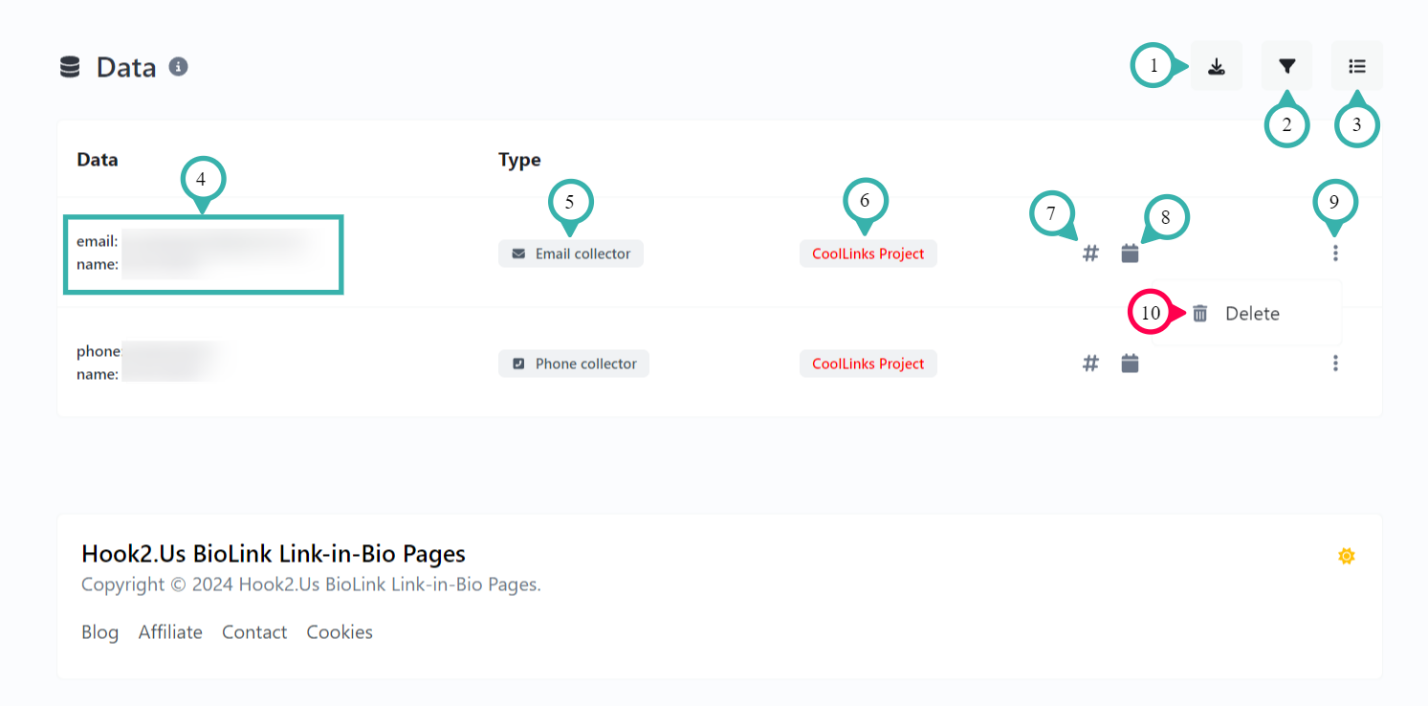
- Export: Download all your user data. Valid formats are CSV, JSON and PDF.
- Filters: Search or sort the data. You can also set the results per page from here.
- Bulk actions: You can click here to select and delete multiple datapoints at once.
- Data: This is the data itself and the content depends on the type of data. For example, an email collector will include email and name of the visitor.
- Type: This is the type of data collector used. For example, email collector or phone collector.
- Project: The project this data has been collected under, if any.
- View biolink: Click here to view the edit page for the biolink that collected the data.
- Created on: The date the visitor entered the data.
- Opens the submenu.
- (Under submenu) Delete: Permanently removes this data from your account. Make sure you’re certain before clicking this, as it cannot be undone.
Related Articles
Shortened Links
Shortened Links Shortened links are useful for a number of reasons. Of course, you can shorten a long or cumbersome URL. You can have a link that’s more closely associated with your brand even if the original URL isn’t. You can configure some ...Biolink Payments
With the right biolink blocks, you can collect payments on your biolink page. These can be donations from visitors or payment for products and services. To set these up, you’ll need a payment processor to process the payments and a payment block on ...Projects
Finding Your Projects Projects are a way you can connect related resources to organize them. It also gives one place to access stats and data from links and biolinks blocks. To find projects, navigate to “Projects” on the left menu on your dashboard. ...Event Links
Finding Your Event Links You can use event links to make it easier for your audience to connect to and remember events. Event links automatically add events to visitors’ calendars. To create or edit event links, navigate to “Event links” on the left ...QR Codes
Finding Your QR Codes QR codes are a visual tool that allow visitors to scan with their phone to get links or info. These could be messages, links, events, and many other things. For QR codes on Hook2.us, navigate to “QR codes” on the left menu of ...